HTTP API Driver
Overview
The driver is designed to retrieve data via calls to a third-party HTTP API. It supports the retrieval of current and historical data, as well as the sending of control commands. Since APIs can vary significantly, the driver supports both a standard operating algorithm and a custom algorithm defined using the JavaScript language.
Download the driver using the link.
Installation
HTTP API Driver is installed in accordance with the general sequence of installing drivers.
Configuring
Interaction with a third-party service that provides an HTTP API is facilitated by a Communicator communication line. There may be one or more devices on the communication line, serving to group outgoing HTTP requests and incoming data in a convenient way. It is recommended to use the corresponding wizards in the Administrator application to add a communication line and devices.
The main communication line options include: communication channel type – Undefined. The device options specify the driver – DrvHttpApi. The following figure shows the device configuration form, providing an overview of the settings structure.
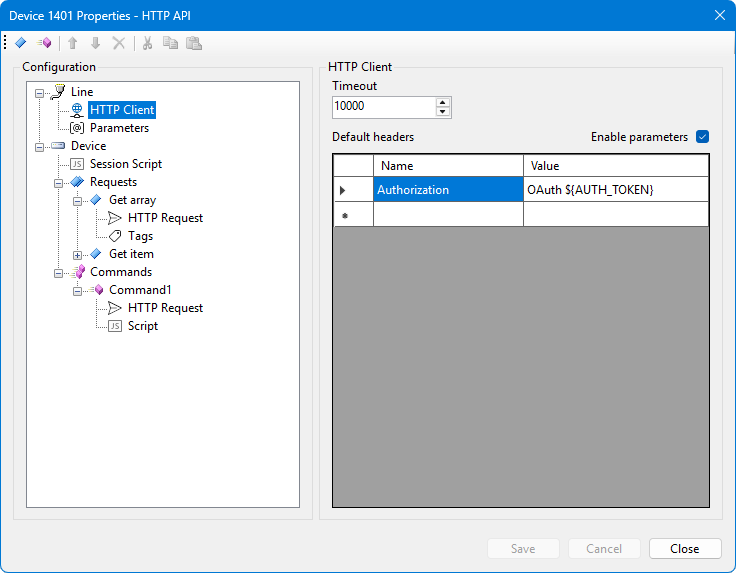
The HTTP client options and the list of parameters are shared across the communication line. This means that if they are modified in the configuration form for one device, they will also be updated in the configuration forms for all other devices associated with the same communication line.
Default headers are added to all HTTP requests. Parameters are applied to them only once, at the start of the communication line, provided that parameters are enabled.
Requests and commands are defined individually for each device. However, it is possible to use the same configuration file for several devices of the same type. To do this, go to the Device Polling section of the communication line options, select the device and specify the short name of the configuration file in the Command line option.
Operating Algorithm
If the session script or command scripts are disabled, the driver operates based on a default algorithm, which is described below. If the scripts are enabled, the driver operates according to those scripts.
The driver sends HTTP requests sequentially. If device tags are specified for a request, the returned HTTP response must be a JSON object in the format { "tagCode": tagValue } in order for the tag values to be read. If no response to an HTTP request is received, or if the response contains an error status, the polling session is not interrupted – execution simply proceeds to the next request.
When sending a control command, an HTTP request specified in the command settings is sent. The command being sent may include arguments in the following format:
arg1=value1\n
arg2=value2
The arguments specified when sending a command are parameters for the command's HTTP request. If a command argument name matches a parameter name from the device configuration, the command argument takes precedence.
When sending requests, both by the default algorithm and by a custom script, the number of reties on error option, which is set in the main communication line options, is taken into account. Additionally, the Pause parameter, configured for each individual device under the Device Polling section, is also applied.
Scripting
Custom scripts are written in JavaScript. A session script, if enabled, defines the polling session algorithm for the device being configured. During a polling session, the script is expected to invoke HTTP requests by name, process the retrieved data, and write the results to device tags.
A command script describes the sending of a specific command. It is intended that the command script will trigger an HTTP request for the command and process the resulting response.
If the user or the system gives a command to stop the Communicator service, any script currently being executed will not be interrupted; it will run to completion.
The HTTP API Driver scripts support the following functions:
| Function | Description |
|---|---|
log(text) |
Outputs the string to the communication line log. |
writeTextFile(shortFileName, contents) |
Writes a text file to the logs directory.shortFileName – short file name,contents – content to be written. |
setTagValue(tag, value) |
Sets the current value of the device tag.tag – tag index or tag code,value – numeric tag value or NaN. |
setTagHistory(tag, timestamp, value) |
Sets the historical value of the device tag.tag – tag index or tag code,timestamp – timestamp, which is a string or a Unix number of seconds,value – numeric tag value.Accessing a tag by index is faster. |
indexOfTag(tagCode) |
Retrieves the tag index based on its code. Returns a numeric index, or -1 if the tag is not found. |
getDeviceNumber() |
Gets the number (identifier) of the device whose script is being executed. |
sendRequest(name) |
Sends a request with the specified name. Returns an object { isSuccess, status, content } |
sendCommand() |
Sends a request for the control command that is currently being executed. Returns an object similar to the previous one. |
addHeader(name, value) |
Adds a persistent header to all HTTP requests on the communication line. |
setHeader(name, value) |
Adds a new HTTP header or overwrites an existing header that was previously added by the script. |
removeHeader(name) |
Removes an HTTP header that was previously added by a script. |
clearHeaders() |
Removes all previously added HTTP headers. |
getParameter(name) |
Gets a parameter value by name. This includes parameters and secrets from the driver configuration, as well as parameters added via a script. Returns an object. |
setParameter(name, value) |
Sets the parameter value. The value is an object. |